TREK: Total Interface
- 4.7
- Rating
- 50.00K
- Installs
- $4.49
- Price
 Analysis by App-foxy
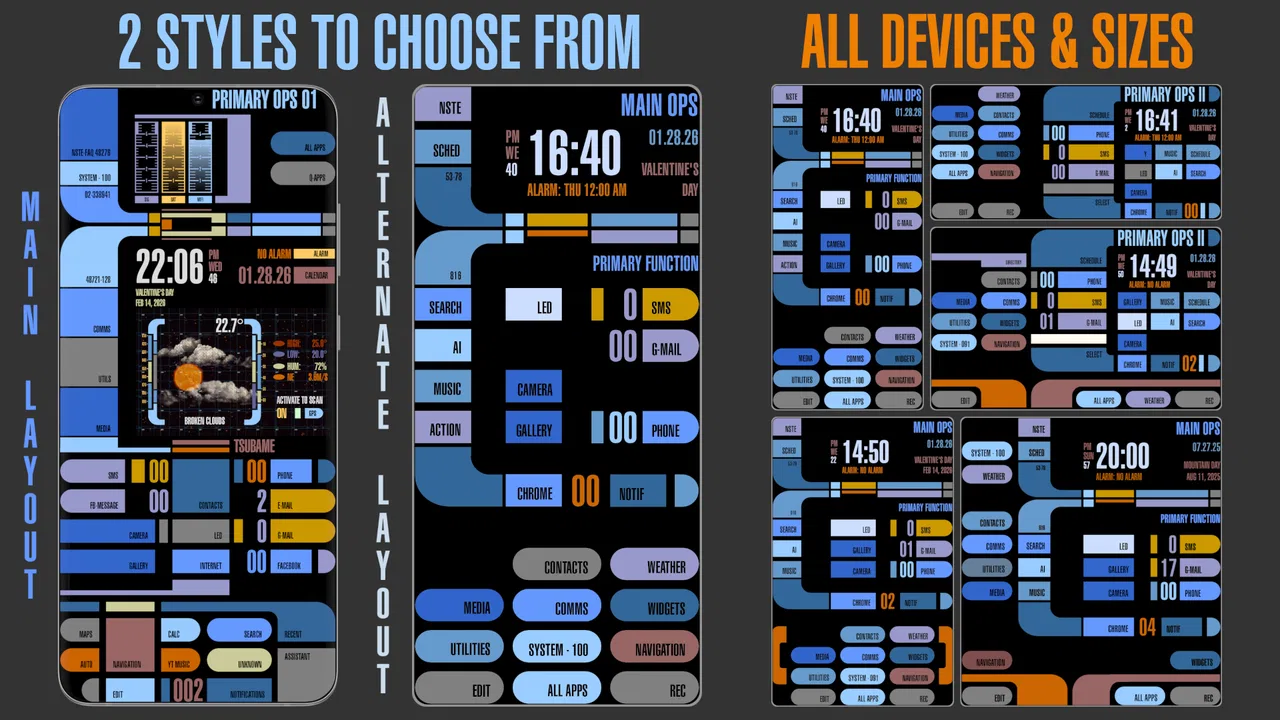
TREK: Total Interface is the kind of Android personalization app that changes the feeling of using a phone rather than simply changing its wallpaper. I spent time with it as a home-screen replacement and found its appeal easy to understand: it turns the first screen into a complete themed interface, with animation and sound built into the experience. My overall view is positive, but with an important qualification. This is best for someone who wants their phone to feel like a deliberately designed environment, not for someone who only wants a faster way to arrange icons.
That distinction matters because ordinary launchers usually focus on efficiency. They give you folders, widgets, app drawers, gestures, and a clean route to whatever you need. TREK takes a more expressive approach. It treats the home screen as the main event, so the visual style and atmosphere are central rather than decorative extras. If you enjoy a strong science-fiction mood and like the idea of interacting with a themed interface every time you unlock your device, it has a clear identity that many conventional launchers lack.
What makes the interface feel different in daily use
The most convincing part of TREK is its sense of continuity. A normal wallpaper can suggest a theme, but the rest of the phone often breaks the illusion as soon as you open the app drawer or move between screens. Here, the home screen, motion, and sounds are intended to belong to the same world. That makes even small actions feel connected instead of looking like a collection of unrelated customization choices.
You May Also Like

 Blood Strike: 2.5 Anniversary
Blood Strike’s Loadouts Turn Every Drop Into a Tactical Gamble
A close look at Blood Strike’s custom loadouts: how fast access to signature weapons reshapes its battle royale rhythm, rewards preparation, and narrows the gap between fights.

 Pandora - Music & Podcasts
Pandora’s Music Is Easy to Start, but Harder to Recover
Pandora’s strength is its low-effort path from a seed to a station. Its weak spot is how much confidence it asks you to place in connection, setup, and quiet recovery.

 8 Ball Pool
 Is Built on Rivalries, Rematches, and Routine
A close look at the rivalries, rematches, shared routines, and unanswered safety questions that turn a quick pool match into a persistent mobile community.

 Samsung Music
’s Quiet Strength Is Playing What You Already Own
Its reach comes less from spectacle than from dependable access to a personal library. That simplicity is both the app’s strongest retention engine and its ceiling.

 AccuWeather: Weather Radar
AccuWeather Review: A Quick, Clear Forecast for Everyday Decisions
For everyday plans, the best forecast is the one you can understand quickly. AccuWeather makes rain timing, radar, and local conditions easy to act on, with a few trade-offs.

 Hill Climb Racing
Why Hill Climb Racing Still Turns Crashes Into One More Run
A tiny car, a bumpy hill and one more upgrade: Hill Climb Racing keeps resurfacing because its simple chaos makes every near-miss feel personal.
More From Our News Desk



I found that this approach works best when the phone is used in short, repeated moments: checking an app, returning to the home screen, opening a favorite tool, or showing the interface to someone nearby. The animation gives those transitions more personality, while the audio adds atmosphere when you are in a suitable setting. It is not trying to make every task faster. Its strength is making the routine of reaching those tasks more distinctive.
There is also a useful psychological difference between a themed interface and a set of downloaded wallpapers. With a wallpaper pack, I still feel as if I am using the same launcher underneath. TREK feels more intentional because the design is built around the whole home-screen experience. That makes it a better choice for someone who values immersion and visual character over endless layout adjustments.
At the same time, the experience asks you to accept the developer’s design decisions. A highly themed interface is less neutral than a standard launcher, and that can be refreshing or restrictive depending on your habits. I could not approach it as a blank canvas in the same way I would approach a minimalist launcher. The trade-off is straightforward: you get a stronger identity, but less of the visual freedom associated with building every detail yourself.
Animation is part of the appeal, not just decoration
The motion is important because it gives the interface a sense of response. Static artwork can look impressive in a screenshot, but it does not necessarily make a phone feel different after a week. In TREK, animation helps maintain the theme during ordinary navigation. I would describe it as an atmosphere-first choice: the movement is there to reinforce the setting and mood, rather than to turn the home screen into a productivity dashboard.
That creates one of the app’s most interesting trade-offs. Animation can make the device feel alive, but it can also become distracting if you prefer a quiet, restrained screen. I would recommend spending a day using it naturally before deciding whether the motion improves your routine. A theme that feels exciting during the first few minutes may feel less comfortable if you are constantly trying to get through tasks as quickly as possible.
My practical tip is to judge the animation in the situations where you normally use your phone, not only while exploring the interface. Try it while moving between messaging, maps, music, and your browser. The right question is not whether the effects look impressive; it is whether they remain pleasant when you are repeating the same actions throughout the day. For me, the visual continuity was the stronger benefit, while the extra motion was more dependent on personal taste.
Sound changes the recommendation more than most people expect
The inclusion of sounds makes this more than a visual customization tool. Audio can make the interface feel much more complete, especially when you are using the device at home or showing the design to a friend. It helps sell the idea that the home screen is a themed environment rather than a static background placed behind shortcuts.
However, sound also makes the app less universally convenient. Many people keep their phone muted, use it in shared spaces, or prefer not to add audio feedback to routine actions. That does not make the feature pointless, but it means the best experience depends heavily on context. I would treat the sound layer as an optional part of the atmosphere rather than the reason to buy the app by itself.
A realistic example is an evening at home when I want the phone to feel more personal and less like a work tool. In that situation, the combination of themed visuals, movement, and sound gives the device a stronger presence. In a quiet office, on public transport, or during a meeting, the same qualities are less useful. This is one reason I see TREK as a lifestyle-oriented home-screen choice rather than a universal replacement for a plain launcher.
How it compares with ordinary launchers and wallpaper apps
Compared with a standard launcher, TREK offers a more finished experience. A conventional launcher is usually better when I want precise control over icon placement, widgets, folders, gestures, and a clean information hierarchy. It is also easier to make a standard launcher visually quiet. If your priority is reducing clutter or reaching apps with the fewest possible steps, the conventional option is likely the better fit.
Compared with a wallpaper application, TREK has a much stronger sense of structure. A wallpaper can change the mood of a phone without changing how the interface behaves. This app goes further by making the home screen itself part of the theme. That is the key reason to choose it over a background-only customization tool: you are paying for a more complete presentation, not merely a new image.
The comparison also explains who should skip it. If you regularly rebuild your home screen around different widgets, prefer several launcher styles, or want a nearly invisible interface, TREK may feel too opinionated. A flexible launcher will give you more room to experiment. Likewise, if you are looking for a productivity-focused home screen that surfaces appointments, tasks, and information immediately, this app’s entertainment and atmosphere value may not justify replacing your current setup.
Where the experience is strongest—and where it asks for compromise
The strongest evidence in its favor is consistency. The app is not merely a collection of science-fiction images. Its purpose is to make the home screen feel like one connected interface, and the animation and sounds support that goal. I appreciate that clarity. Many personalization tools offer dozens of disconnected options, while TREK appears more confident about the experience it wants to create.
That confidence is also its main limitation. The more complete a theme feels, the less it behaves like a neutral foundation for other designs. I would not install it expecting the same broad customization range as a feature-heavy launcher. Its value comes from accepting the overall presentation. If that presentation matches your taste, the limitation feels like focus. If it does not, there may be little reason to keep it installed.
Another practical consideration is that a home-screen replacement sits at the center of your daily phone habits. Small differences in navigation matter more here than they would in a rarely opened app. Before committing to the change, I would move through the actions that matter most to you: opening communication apps, finding settings, returning home, and switching between recent tasks. This simple test tells you more than a screenshot because it reveals whether the themed interface fits your muscle memory.
The app is also a paid personalization purchase at $4.49. I think that price makes more sense for someone who will keep the theme for a long period than for someone who changes launchers every few days. A free wallpaper is easier to abandon without regret, while a paid complete interface needs to earn its place through repeated use. My advice is to buy it for the experience, not because you expect a collection of unrelated customization tools.
Who will get the most from it
I would recommend TREK to Android users who enjoy distinctive interfaces and want their phone to have a recognizable personality. It is especially suitable for someone who sees the home screen as part of the fun of owning a device. Fans of futuristic visual design may appreciate that the theme extends beyond a single background and includes motion and sound as part of the presentation.
It can also work well as a conversation piece. If you often show friends unusual technology, themed devices, or custom setups, the complete interface has more impact than a simple icon pack. The experience is easy to understand visually: the phone looks and behaves like it belongs to a particular setting. That immediate impression is one of its genuine strengths.
I would be more cautious about recommending it to people who depend on a highly organized work layout. If your home screen is built around multiple widgets, dense shortcuts, and rapid information scanning, a conventional launcher may serve you better. The same applies if you dislike animation or sound in everyday navigation. Those are not minor details here; they are part of what gives the app its character.
It is also worth considering the age of the device. TREK supports Android from version 4.0 onward, which makes it accessible across a broad range of older Android phones. That compatibility is useful for anyone who wants to give an older device a fresh identity. Still, compatibility alone does not guarantee that every phone will feel equally comfortable with an animated, sound-rich interface, so I would pay attention to how the experience feels on your particular hardware.
What the app’s track record suggests
NSTEnterprises has kept this personalization project available since February 13, 2016, and the current release is version 28.0. That long presence gives TREK a different character from a brand-new theme that may disappear after a short period. I also find the audience response encouraging: it holds a 4.7 average from around 2.1 thousand ratings, with roughly 769 written reviews and more than 50 thousand installs.
Those figures do not make it automatically right for everyone, but they do suggest that the concept has found a committed audience. The important point is that people are responding to a specific style rather than to a generic utility promise. I would read the reception as evidence that the complete-interface idea works for users who actively want this kind of themed experience.
The content rating is Everyone, which makes the app broadly approachable from an age-rating perspective. Its category is Personalization, and that is an accurate description of what it does: this is about changing how the device feels and looks, not adding a new communication, media, or work function. The purchase decision therefore depends almost entirely on whether you value the design experience enough to make it part of your daily routine.
Small workflow decisions that improve the experience
One useful way to evaluate TREK is to separate discovery from routine. On the first day, explore the interface and notice which actions feel natural. On the following days, stop judging it as a novelty and use the phone normally. This prevents the initial science-fiction appeal from hiding practical friction. If you still enjoy returning to the home screen after the novelty settles, the app is probably a good match.
I would also keep the home screen focused rather than filling it with every shortcut at once. A complete theme can lose its visual impact when it becomes crowded. Keeping only the apps you reach most often lets the design remain legible and makes the interface feel more like a deliberate control panel. This is not a demand for minimalism; it is a way to protect the visual hierarchy that makes the app worthwhile.
For people who use their phone in different environments, sound deserves a conscious decision. Use the audio when you want the full atmosphere, but do not feel obligated to treat it as essential during every task. The visual design can carry much of the identity on its own. Thinking of sound as a situational layer makes the app easier to live with than treating every effect as something that must remain active all day.
Finally, compare the app with your current launcher by looking at the whole routine rather than one attractive screen. Ask whether you open apps more comfortably, whether the theme remains pleasant after repeated use, and whether the interface makes the device feel more personal. Those questions expose the real trade-off: TREK may give you more emotional connection to the home screen, while a standard launcher may give you more control and speed.
My recommendation after living with the concept
I see TREK as a focused, characterful purchase rather than a general-purpose launcher recommendation. Its complete themed approach is more memorable than a wallpaper and more atmospheric than a typical productivity-oriented home screen. The animation and sounds give it a real point of view, and that point of view is exactly why it can feel special to the right person.
My reservation is equally clear: the experience is not designed for everyone. Users who want maximum flexibility, dense information, or a nearly silent interface should choose a conventional launcher instead. The paid price also means the app needs to become part of your long-term setup, not merely provide a few minutes of visual novelty.
For me, the deciding question is simple: do you want your phone to feel like a tool with a customized background, or do you want the home screen itself to become a themed environment? If the second answer sounds appealing, TREK is an unusually direct way to get there. If the first answer is closer to your habits, its strongest features may feel like extra layers rather than meaningful improvements.
Overall, I recommend it to Android users who enjoy futuristic design, appreciate a unified presentation, and are willing to trade some launcher neutrality for atmosphere. NSTEnterprises has built a personalization app with a clear thesis, and the positive response from its audience reflects that focus. TREK is at its best when you want the act of unlocking and navigating your phone to feel like part of the experience, not just the path to another app.
FAQs for TREK: Total Interface
01What is TREK: Total Interface, and what can I use it for?
TREK: Total Interface is an Android customization app inspired by futuristic space and starship-style computer interfaces. It can replace or complement parts of your standard home-screen experience with themed panels, shortcuts, information displays, and visual elements. It is mainly intended for users who enjoy science-fiction design and want a more immersive interface rather than a conventional minimalist launcher.
02Does TREK: Total Interface work on every Android phone?
The app should work on many relatively recent Android devices, but the exact experience can vary according to your phone model, Android version, screen size, and manufacturer software. Some interface features may require permissions or may behave differently when used alongside another launcher. Before installing, check the current Google Play compatibility information and be prepared to adjust default-launcher, display, notification, or accessibility settings if the app requests them.
03Is TREK: Total Interface a complete launcher replacement?
TREK: Total Interface may function as a themed interface or launcher-style environment, but users should not assume that every feature of a traditional Android launcher is included. Depending on the version, it may focus more on presentation, navigation, widgets, and futuristic controls than on advanced icon-pack support, gesture customization, or extensive home-screen management. Review its available settings after installation to determine whether it suits your daily workflow.
04Does TREK: Total Interface require special permissions or access to personal data?
Like many apps that modify the home screen or display system information, TREK: Total Interface may request permissions related to notifications, accessibility, overlay display, device status, or becoming the default launcher. These permissions can be necessary for certain functions, but you should read each request carefully and grant only what you are comfortable with. If a permission is not needed for your preferred features, it is safer to leave it disabled.
05Is TREK: Total Interface free to download, and are there ads or in-app purchases?
The availability of free features, advertising, and optional purchases can change between app versions and regions. Before downloading, check the official store listing for the current pricing details, subscription information, advertisements, and in-app purchase notes. Also review recent user feedback, since updates may alter the balance between free and premium content. If you decide the interface is not for you, restore your previous launcher before uninstalling.
Pros
- Clean
- futuristic interface with a strong sci-fi visual identity.
- Useful customization options for organizing shortcuts and widgets.
- Smooth transitions make everyday navigation feel polished.
- Minimal layout keeps key information easy to find.
- Works well for users who enjoy immersive space-themed designs.
Cons
- The theme may feel too specialized for users who prefer conventional interfaces.
- Some customization features may require extra setup time.
- Small text and icons can be difficult to read on compact screens.
- Performance may vary on older or less powerful devices.
- The interface can prioritize style over quick
- practical access.

TREK: Total Interface
Gallery